
Day Trading SImulator & Games
KovetsFinance
4.6189.00 Reviews
- Version
- 2.2.244
- Installs
- 1.00M
- Age Rating
- Everyone
Screenshots
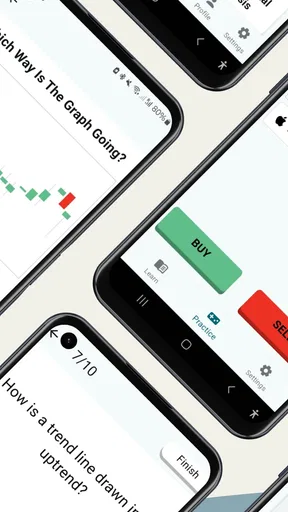
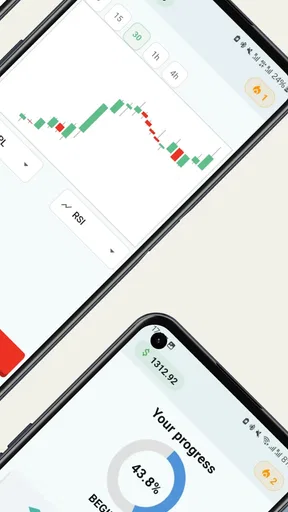
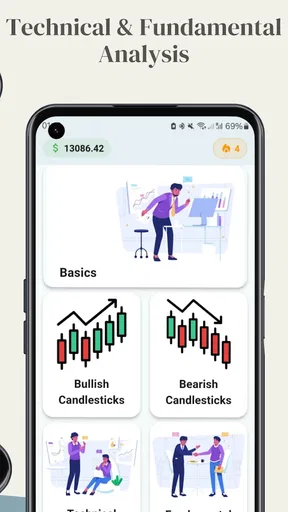
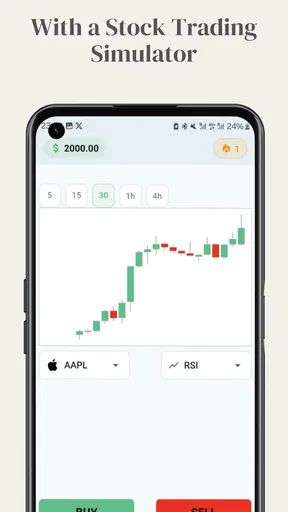
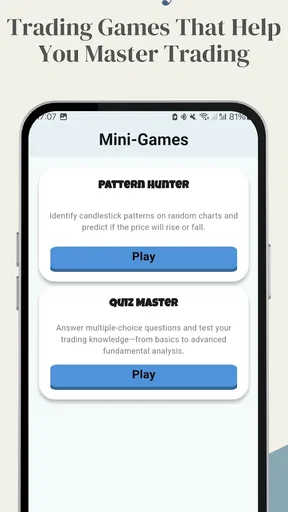
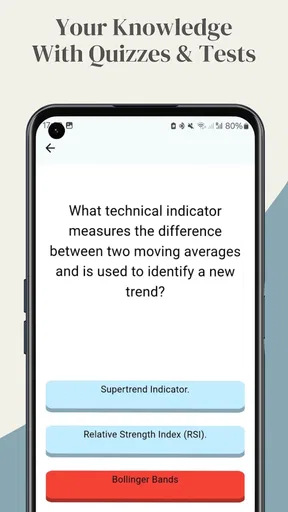
Our Review of Day Trading SImulator & Games
 Analysis by Appyee
I treat a trading simulator as a place to practise decisions, not as a shortcut to predicting markets. That distinction matters with Day Trading Simulator & Games: its game-like approach can make trading concepts less daunting, but a virtual result cannot tell me how I would react to losing real money. I’d use it to build familiarity and test my thinking, then keep those lessons separate from any real investment choice.
What to expect when a connection matters
The app’s appeal depends partly on the experience feeling connected to market activity and other people. Its simulated market uses real-time data, while the leaderboard and community add social elements. In practice, those are the moments when a dependable connection is most relevant: a market simulation is less useful if the information feeding it is delayed, and community discussion naturally works best when it can load and respond.
I would not treat a quick glance at a simulated result as a reliable signal to trade outside the app. A real-time feed can make practice feel more immediate, but it does not turn a learning game into a brokerage account or guarantee that a strategy will work in changing conditions. The useful question is whether I can explain why I made a simulated trade, not simply whether the virtual outcome was positive.
Small mobile sessions, with a purpose
This is easiest to use when I give a session a narrow goal. For example, I might spend a short break reviewing the tutorial, then later try one challenge and note what prompted each decision. That is more valuable than opening the app repeatedly just to chase points or check a leaderboard. The missions can provide direction, but I’d still pause to think through what each task is teaching.
A realistic routine could be a beginner checking the app after work, practising a buy-and-sell decision with virtual money, and then reading an educational piece to understand the idea behind it. Keeping those steps distinct helps: the simulation is for trying a choice, while the article or video is for learning a concept. If the network is weak during a commute, I’d save the more connected parts for later rather than assume every feature will be available.
What to do when the experience falters
For a finance app, a stalled screen can interrupt concentration even when no real funds are involved. If a chart or community area does not respond, I’d avoid making a rushed decision based on a partial view. I would wait for the information to refresh, check the connection, and return to the exercise only when the screen is behaving normally. That is a sound habit for a simulator and an even more important one in real financial tools.
There is also a mental reset worth practising: if an interruption breaks the thread of a simulated trade, review the reason for the original decision before continuing. Trying to reconstruct it from memory can turn a learning exercise into guesswork. The app can help you rehearse the mechanics, but deliberate notes or a simple personal record can make the lesson easier to revisit.
Using it without wasting mobile data
Because the experience includes market information and media such as articles and videos, I’d be selective about when I browse. On a limited data plan, reading a short piece may fit a quick session better than playing videos or keeping the app open while switching between sections. I would also avoid leaving a simulation running in the background simply to watch for activity; a focused visit makes it easier to learn what caused a choice and what happened next.
Those habits are not just about data. They reduce the temptation to treat every fluctuation as something that demands a reaction. A simulator is most useful when I can stop, review a decision, and move on rather than follow every update. If your main goal is uninterrupted market monitoring, a dedicated market-information tool may suit that routine better.
Who benefits most from this format
The strongest fit is someone who is curious about day trading but wants a low-pressure way to learn basic mechanics before risking money. The tutorial, virtual funds, challenges, and educational material give a newcomer several ways to approach the subject: follow an explanation, try a decision, and then see how the exercise feels. I also see value for a casual learner who wants a more active alternative to reading about markets alone.
I would be more cautious if you already rely on advanced chart analysis or need professional research tools. The app’s beginner-friendly presentation is part of its appeal, but that same simplicity may leave an experienced trader wanting deeper analysis. It is also not the right substitute for a regulated service if your aim is to place actual trades, manage a portfolio, or get individualized financial advice. Practice can build familiarity; it cannot remove the risk of real investing.
How I’d use the simulator thoughtfully
I’d make each session answer one small question rather than trying to master trading all at once. Before using a mission or virtual trade, I’d decide what idea I want to test, then review whether the result supports my reasoning or merely reflects a lucky outcome. That gives the practice a clearer purpose and makes it easier to notice what I still need to learn.
A better way to learn from virtual trades
One useful habit is to decide on a reason for each simulated trade before tapping buy or sell. I might write down whether I am following a chart movement, testing a lesson, or responding to a challenge. Afterward, I can compare the outcome with that original reason. This makes a virtual win less likely to be mistaken for proof that my approach is sound, and a loss more useful than merely frustrating.
I’d also resist trying to learn everything in one sitting. A beginner can focus first on what the tutorial explains, then use a mission to practise one idea at a time. When a game task encourages quick decisions, it is worth asking whether the speed is part of the lesson or just part of the game’s pacing. That small check helps keep entertainment from replacing understanding.
How it compares with familiar alternatives
Compared with a finance article or a conventional market-news app, this simulator asks for active participation: I make choices and see them play out in a virtual setting. That can make the basic rhythm of buying and selling easier to grasp than reading definitions alone. Compared with a real brokerage app, though, it is a practice environment rather than a place to manage actual money, so the emotional stakes and practical responsibilities are different.
It also sits between solitary study and a purely competitive game. The educational material offers a way to learn, while missions and a leaderboard can make practice feel more engaging. The trade-off is that points, levels, or comparisons with other users can draw attention away from the quality of the decision. I’d use those features as motivation, not as a scorecard for whether I’m ready to trade for real.
Practical details before you install
As a finance app from Kovets, it is free to download, with in-app purchases listed from $4.49 to $117.30 per item. I’d check purchase prompts carefully and decide in advance whether I want to spend anything; the core reason to try a simulator is to practise, not to feel pressured into buying extras. Its Everyone age rating makes it broadly accessible, though younger users should still understand that simulated trading is not a promise of real-world returns.
The app was released on May 11, 2022, and its current version is 2.2.242, with Android 8.0 as the minimum operating system requirement. It has an average rating of 4.6 from around 12,000 ratings and more than 1 million installs. Those figures suggest it has found an audience, but they do not settle whether its style fits you; I’d judge it by whether the lessons and practice format match your goals.
First Impressions
When I first opened Day Trading Simulator & Games, I was greeted by a sleek and intuitive interface. It’s designed to feel like a real trading platform, but with a friendly twist. No overwhelming graphs or complex data tables here, just a clean layout that makes it easy to get started.
Getting Started
Starting off, the app provides a handy tutorial that explains the basic concepts of day trading. It’s perfect for beginners like me who need a little hand-holding before diving into the deep end. You’ll learn about buying and selling stocks, reading charts, and even some nifty trading strategies.
One thing I appreciated was the app’s option to practice trading with virtual money. This feature allows you to experiment without any financial risk, a huge plus for anyone testing the waters.
Features That Stand Out
What makes this app a standout is its game-like elements. It offers challenges and missions that keep you engaged while learning the ropes. You’ll feel a bit like a trader in a video game, completing tasks to earn points and unlock new levels.
The simulated trading environment is surprisingly realistic. Real-time data is used to mimic the stock market, giving you a sense of how your strategies might play out in the real world. Plus, there’s a leaderboard where you can compete with friends or other users, adding a layer of competition that keeps things exciting.
Community and Learning
The app doesn’t just leave you to your own devices; there’s a community feature where you can share tips, ask questions, or just chat with fellow traders. It feels like being part of a club where everyone is eager to learn and share knowledge.
Educational content is also a strong point. The app provides articles and videos on various trading topics, from beginner tips to advanced strategies. Whether you’re a newbie or a seasoned trader, there’s always something new to learn.
User Experience
I found the app to be incredibly user-friendly. Navigation is smooth, and the design is visually appealing without being cluttered. The performance is top-notch, with no noticeable lags or crashes during my time using it.
The developers have clearly put thought into making it accessible for users of all skill levels. Whether you’re casually interested in trading or looking to seriously hone your skills, this app provides the tools you need.
Room for Improvement
While Day Trading Simulator & Games is impressive, there’s always room for improvement. I’d love to see more interactive elements, such as live webinars or Q&A sessions with seasoned traders. Also, while the app is great for beginners, advanced traders might crave even more in-depth analysis tools.
It would also be beneficial to have a feature that tracks your progress over time, offering insights into your trading habits and areas for improvement. This could help users refine their strategies and become more successful in the real market.
Final Thoughts
Overall, Day Trading Simulator & Games is an excellent app for anyone interested in the stock market. It’s a fun and educational tool that allows you to explore trading without the financial risk. The combination of gamification and practical learning makes it a stand-out choice for both beginners and those looking to sharpen their trading skills.
If you’re ready to embark on a virtual trading adventure, you can download the app from your favorite app store. It’s a risk-free way to see if the world of day trading is for you, and who knows? You might just discover a hidden talent for investing!
My connectivity verdict
For me, the connection-dependent elements are part of the point: live market information gives practice a sense of movement, and the community can add another perspective. They also mean this is best approached when you have a stable connection and enough time to pay attention, rather than as something to rely on in a hurry or during a patchy commute.
I’d recommend trying it if you want an approachable, game-shaped introduction and can keep virtual practice in its proper lane. If you need sophisticated analysis, real-money trading, or a tool built primarily for tracking markets, another finance app will be a better fit. Used with patience, this one can make learning more engaging; the real value comes from thinking carefully about the decisions, not from treating a simulated result as a forecast.
Verdict
Strengths of Day Trading SImulator & Games
- Realistic trading scenarios enhance learning.
- Wide range of assets for diverse strategies.
- User-friendly interface for easy navigation.
- Detailed analytics to track performance.
- Includes tutorials for beginners.
Limitations of Day Trading SImulator & Games
- Limited real-time market data.
- No social trading feature available.
- In-app purchases can be costly.
- Graphics can be improved for engagement.
- Requires internet connection to play.
Similar Picks in This Category
View All
Google Wallet
Google LLC4.3

Airtel: Recharge, Bank & Loans
Airtel4.0

PayPal - Pay, Send, Save
PayPal Mobile4.2

DANA Indonesia Digital Wallet
PT Espay Debit Indonesia Koe4.5

Binance: Buy Bitcoin & Crypto
Binance Inc.4.8

Cash App
Block, Inc.4.7
Frequently Asked Questions
What is the main purpose of the Day Trading Simulator & Games app?
The Day Trading Simulator & Games app is designed to offer users a risk-free environment to practice trading. It allows beginners to learn market strategies and seasoned traders to refine their skills without financial risk. The app simulates real-world trading scenarios with virtual currency, making it an educational tool for all levels.
Is the Day Trading Simulator & Games app suitable for beginners?
Yes, the app is highly suitable for beginners. It includes tutorials and guides to help new users understand the basics of trading. The user-friendly interface and step-by-step instructions make it easy for beginners to navigate and learn at their own pace without the fear of losing real money.
Does the app require an internet connection to function?
Yes, the Day Trading Simulator & Games app requires an internet connection. This is essential for providing real-time market data and ensuring users have the most accurate and up-to-date information for their trading simulations. However, some basic features may be accessible offline.
Are there any in-app purchases in the Day Trading Simulator & Games app?
While the app is free to download and use, it offers in-app purchases. These purchases can enhance the user experience by providing additional features, such as advanced trading tools, personalized coaching, and access to premium market data. Users should review these options to decide which, if any, are beneficial for their trading education.
How does the app ensure the accuracy of the simulated trading environment?
The app uses real-time market data and sophisticated algorithms to replicate the dynamics of live trading environments accurately. This includes realistic fluctuations in stock prices, currency exchange rates, and other market variables. Regular updates ensure the app remains aligned with actual market conditions, providing a reliable simulation experience.
